How To Optimize Your Pages For SEO
Making sure that your website has the correct page titles, URLs, slugs, image titles, alt tags, and h1-h3 tags all seem like a lot of useless busy work, but these are in fact the lowest hanging fruit that you can tackle to help increase your website’s search engine visibility. While making these changes won’t guarantee a spot on the front page, it will help ensure that the traffic that does come to your website is more likely to actually be interested in the page’s content, therefore more likely to convert into a customer.
Optimize Your Page Titles/Descriptions
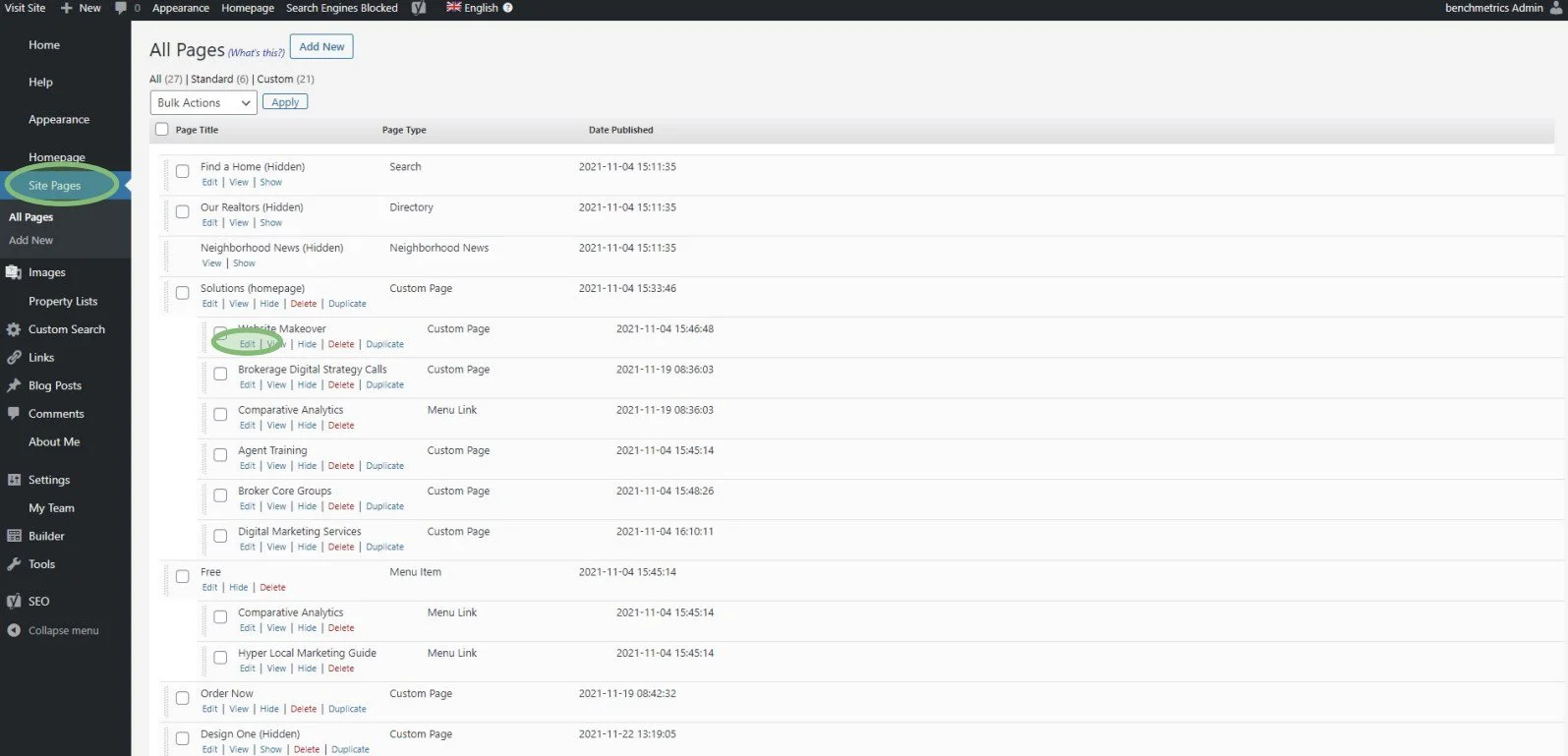
In order to edit page-specific SEO, navigate to “Site Pages” on the side menu and click “Edit” on the page you want to make changes to.
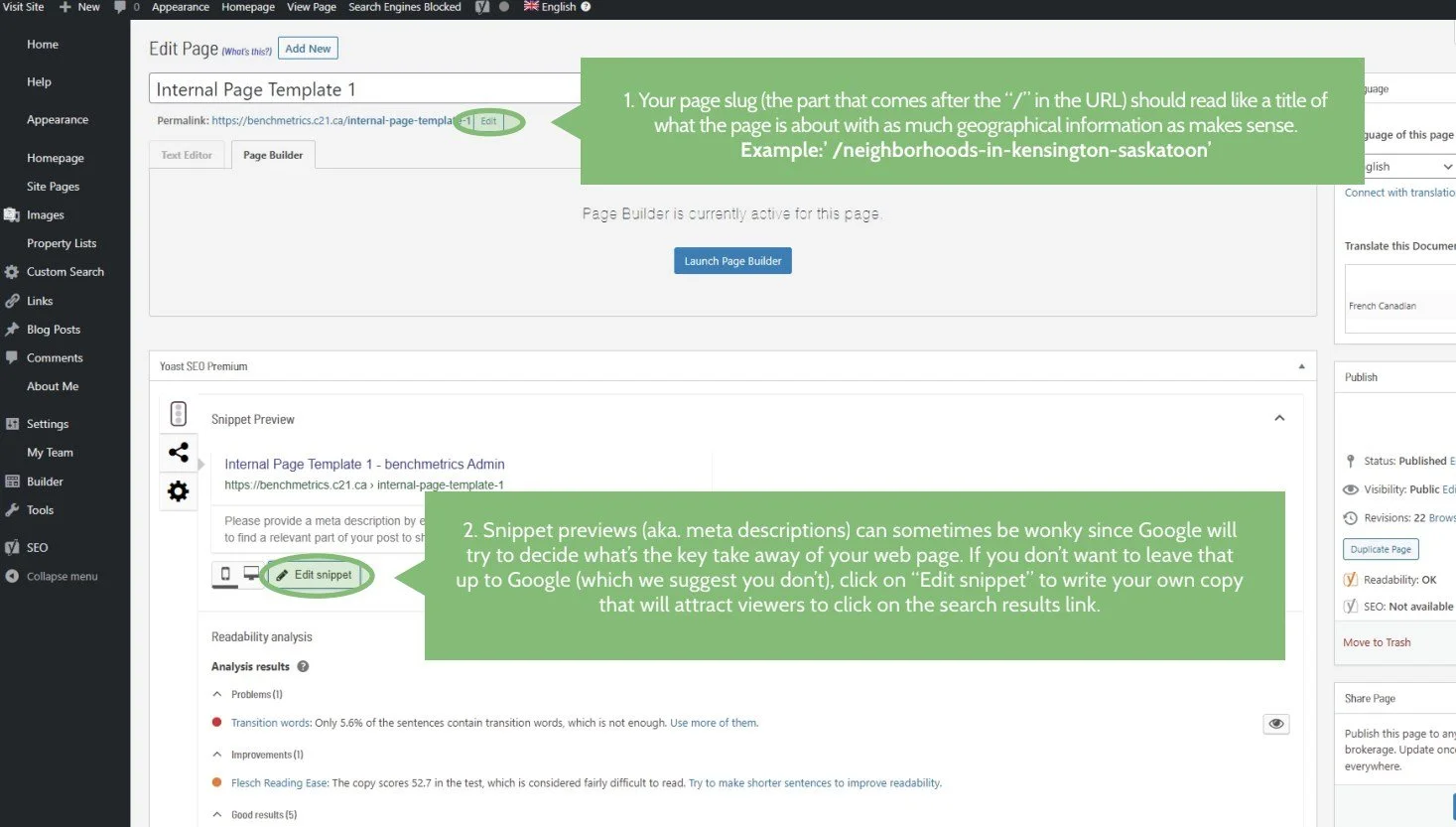
Your page slug (the part that comes after the “/” in the URL) should read like a title of what the page is about with as much geographical information as makes sense.
Example: /neighborhoods-in-kensington-saskatoonSnippet previews (aka. meta descriptions) can sometimes be wonky since Google will try to decide what’s the key takeaway of your web page. If you don’t want to leave that up to Google (which we suggest you don’t), click on “Edit snippet” to write your own copy that will attract viewers to click on the search results link.
You know best what people are looking for if they visit this page. Make sure that information is conveyed here in a brief 1-2 sentences.
Important
Once finished, make sure to click the blue “Update” button to save your changes!
Optimize Your Images
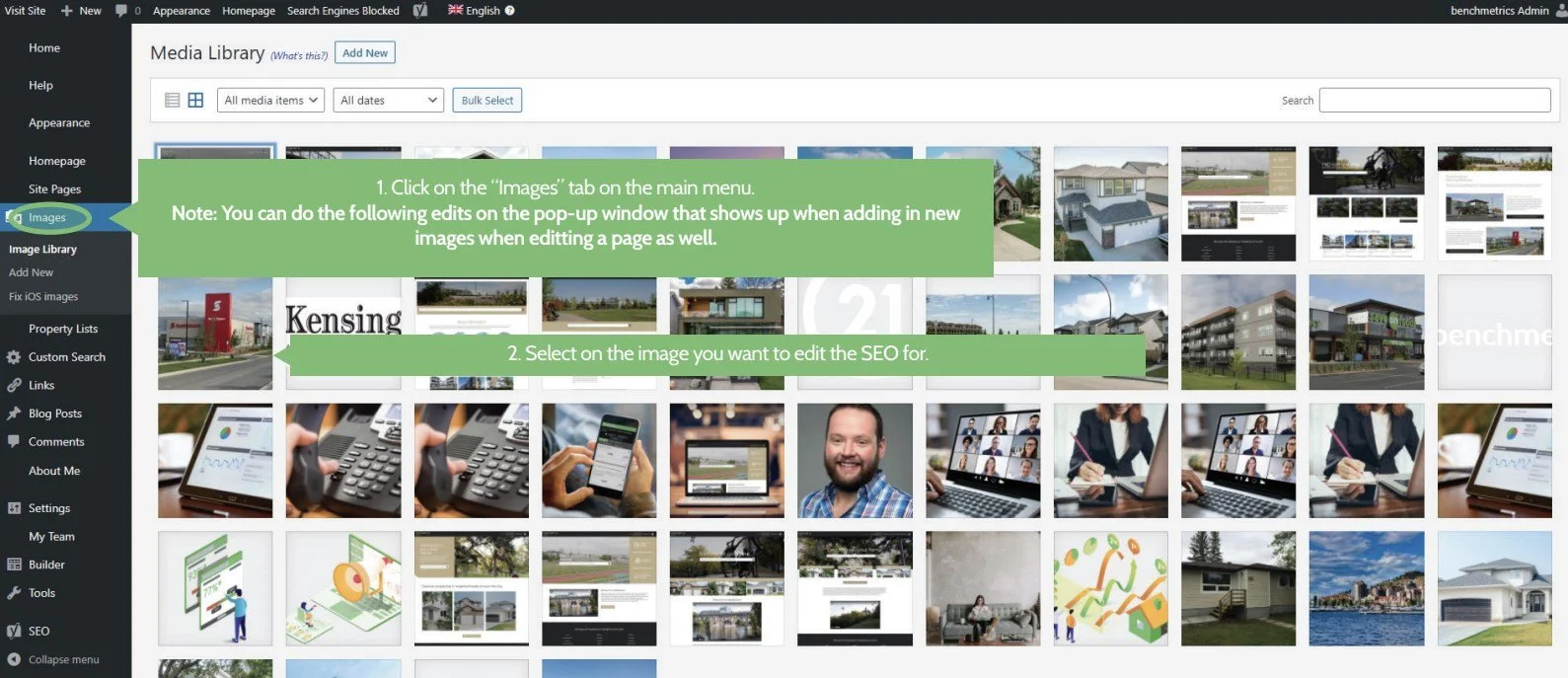
To edit your images, click on the “Images” tab in the dashboard, and select the image you want to edit.
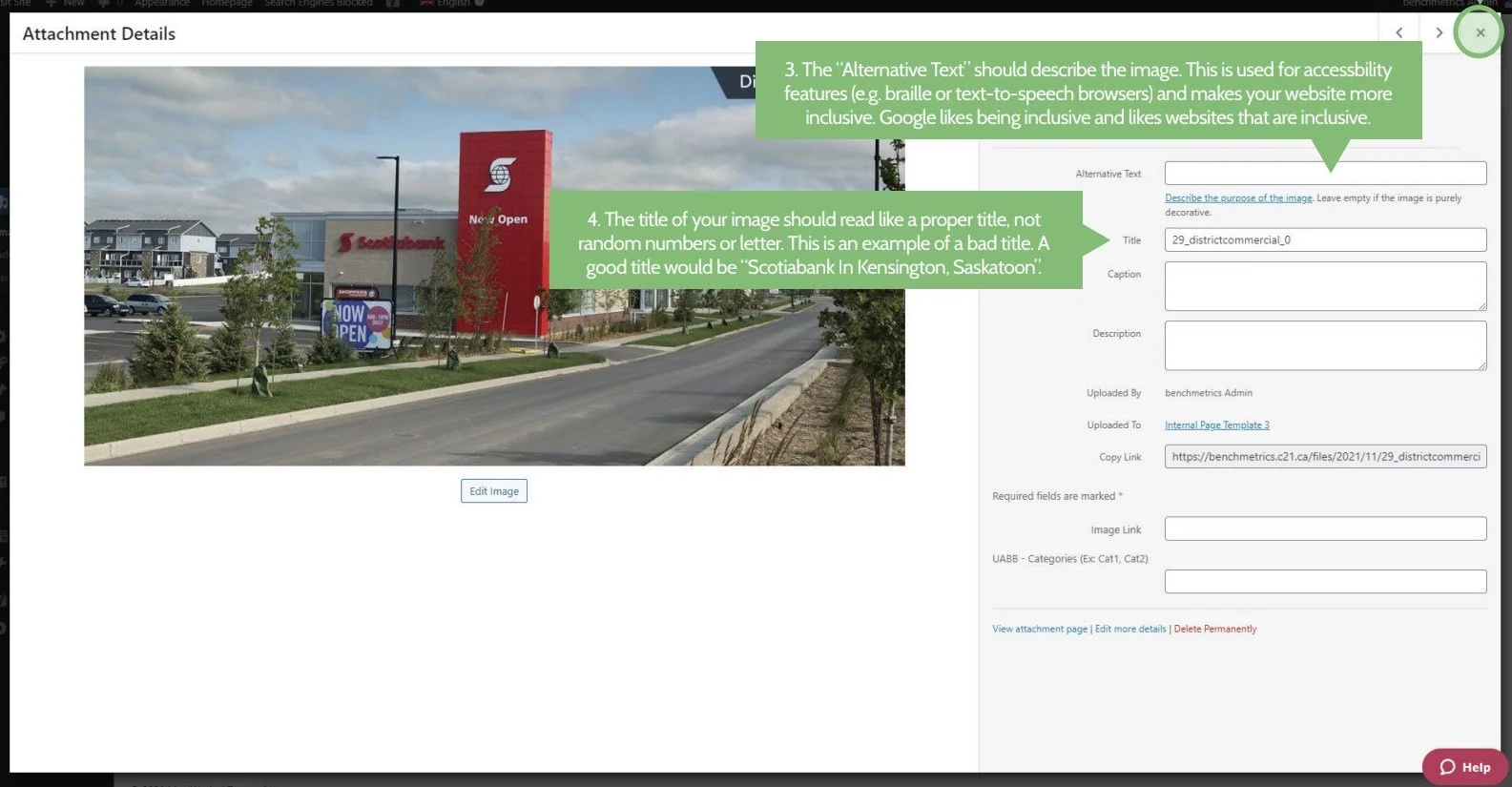
The “Alternative Text” should describe the image. This is used for accessibility features (e.g. braille or text-to-speech browsers) and makes your website more inclusive. Google likes being inclusive and likes websites that are inclusive.
The title of your image should read like a proper title, not random numbers or letters.
Optimize Your Page Content
To edit your pages, navigate to the page you want to edit and click the “Page Builder” button.
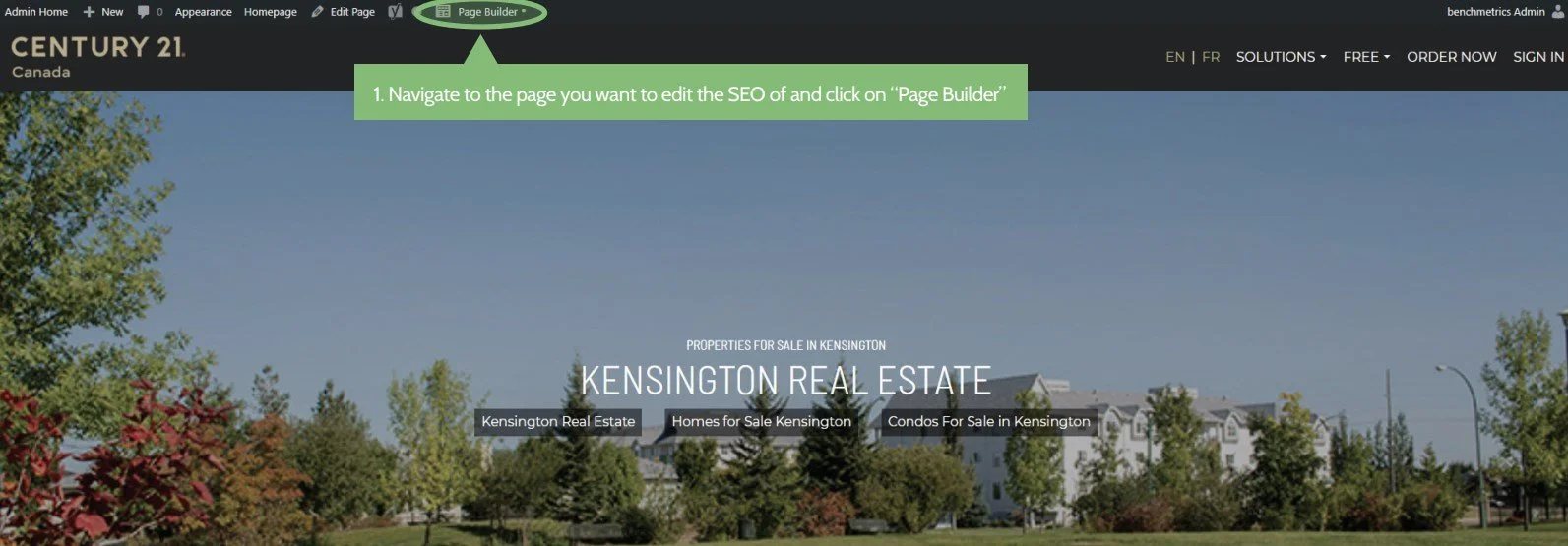
What you need to know about headings:
There is a hierarchy to headings. Heading 1 (or h1) is the most important, Heading 2 (h2) is second-most important, Heading 3 (h3) is the third-most, and this goes on until h6.
It is extremely important for SEO that your heading hierarchy is used accordingly. A page dedicated to “Kengsington Real Estate” should have “Kensington Real Estate” as an h1, secondary headings related to Kensington Real Estate (such as “About Kensington”) in h2, and sub-topics (such as “Types of Homes In Kensington”) in h3. Using this correctly helps Google understand what is important on this page and whether or not to suggest this page to users when they search for something.
How to Change the Heading Hierarchy
Click on any title and make sure it is in a heading block. If not, you can drag one out using the “+” icon on the top right corner of the page and replace it.
Update the HTML Tag to an appropriate heading level (h1, h2, or h3).
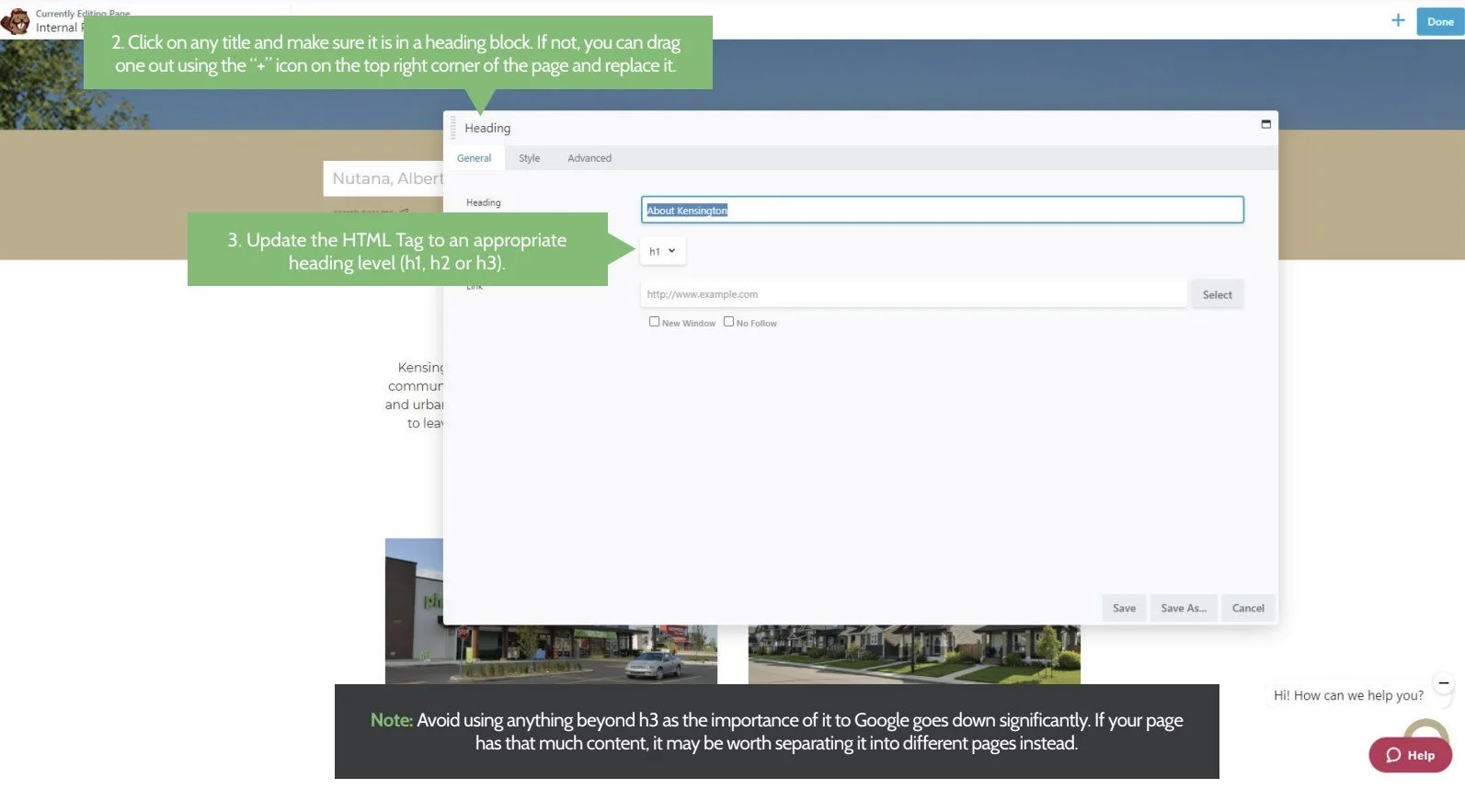
Important
Avoid using anything beyond h3 as its importance of it to Google goes down significantly. If your page has that much content, it may be worth separating it into different pages instead.
More SEO Tips
Make use of long-tail keywords
in your page’s copy as often as possible as covered in Century 21’s Hyperlocal Marketing Guide.Make sure your images and body text match.
This matters less, but Google can now start to understand the relevance of pictures in the context of the page, so use relevant photos whenever possible and shy away from stock images whenever possible.Write your own, original copy.
Google knows when you simply copy and paste content from another website and will dock points for your SEO ranking for that. Google wants more unique pages to serve customers, so unique copy is a must.Link back to your own internal pages whenever possible.
If you have a page talking about the Kensington neighborhood, link to other neighborhood pages maybe under an h3 title that says “Similar Neighborhoods Like Kensington”.Get linked from other websites legitimately.
Whenever possible, collaborate with other websites for them to drop a link to your website. It lends credibility to your website when people refer traffic to you. That said, do not pay for this service. Google knows if you’re paying for it and will deduct SEO points for that.Use lists whenever possible.
Google doesn’t really care what form your content is in, as long as it’s unique and relevant to the page, but users much rather bullet points and succinct messaging rather than long, full-bodied essays to read.
-
Content Production
- Jan 10, 2024 How to Use The Featured Listings Widget From Benchmetrics
- Feb 6, 2023 How to Add The Listings Catalog to Your Website
- Oct 28, 2022 Page Building Guides
- Oct 26, 2022 Internal Page Design 4 Walkthrough Guide
- Oct 26, 2022 Internal Page Design 3 Walkthrough Guide
- Oct 26, 2022 Internal Page Design 2 Walkthrough Guide
- Oct 26, 2022 Internal Page Design 1 Walkthrough Guide
- Oct 26, 2022 How to Create and Use Custom Searches
- Oct 20, 2022 How to Add Videos to Your Real Estate Website
- Sep 7, 2022 Content Writing 101
- Jul 13, 2022 Get Your Listings First on Google
- Jul 12, 2022 Real Estate Video Hardware Recommendations
-
Getting Started
- Oct 28, 2022 Page Building Guides
- Oct 5, 2022 CREA DDF Feed Setup Tutorial
- Jul 13, 2022 How To Grant Access To Your Website
- Jul 13, 2022 How To Access Your Agent’s Websites
- Jul 13, 2022 How to Add Benchmetrics to Your Facebook Page
-
Optimization
- Jul 15, 2022 How to Hide Pages on Your Website
- Jul 13, 2022 Optimize Your Website Navigation
-
SEO
- Oct 20, 2022 How to Add Videos to Your Real Estate Website
- Sep 7, 2022 Content Writing 101
- Jul 15, 2022 Get a Custom Domain for Your Website
- Jul 14, 2022 How To Optimize Your Pages For SEO
- Jul 13, 2022 Get Your Listings First on Google
-
Social Media
- Dec 20, 2022 How to Install Facebook Messenger on your Real Estate Website
- Jul 14, 2022 Put Your Listings on Facebook Marketplace
- Jul 13, 2022 Facebook Messenger And Auto Responses Guide